Keys and certificates
Cloud PGP & S/MIME Key Management
Public-key encryption depends on having the right key for the right recipient. Certificate-based email adds issuance, validation, renewal and revocation considerations.
CloudPGP describes how the underlying platform supports a centralized approach to these operational tasks.
PGP key handling
Platform documentation describes the following PGP key capabilities:
- sender-key generation within the platform;
- configurable RSA key sizes of 2048, 3072 or 4096 bits in the referenced PGP configuration, which shows 3072 bits as its default;
- LDAP lookup of recipient public keys;
- publication of sender public keys;
- import of existing PGP private keys;
- a REST API capability for exporting PGP private keys.
Key sizes and defaults shown in platform documentation must be confirmed against the active configuration of a given deployment. They are not a guarantee that applies to every account.
S/MIME certificate lifecycle
Certificate services may automate parts of the certificate lifecycle for supported systems: request, issuance, import, deployment, renewal and rollover.
Maintaining valid credentials depends on the integration, the certificate provider and configuration. Certificates from a source without a supported integration may need to be renewed manually. See Certificate issuance and lifecycle.
S/MIME signing precedence
Signing policy decides which key signs an outgoing S/MIME message. The excerpt below comes from the underlying platform’s administration interface and lists the available signing modes. It is a sourced screenshot for illustration, not a working control.
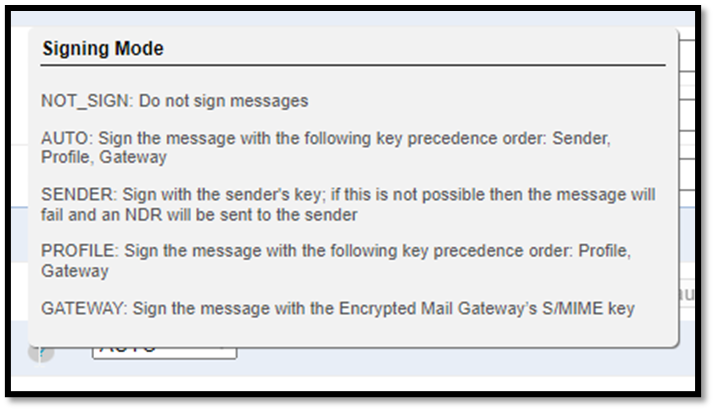
| Mode | Behavior |
|---|---|
NOT_SIGN | Messages are not signed. |
AUTO | Sign with the first available key in this order: sender, profile, gateway. |
SENDER | Sign with the sender’s key. If that is not possible, the message fails and a non-delivery report (NDR) is sent to the sender. |
PROFILE | Sign with the first available key in this order: profile, gateway. |
GATEWAY | Sign with the encryption gateway’s S/MIME key. |
Choosing a mode is a trade-off. SENDER ties every signature to the individual sender but stops delivery when that key cannot be used, while AUTO and PROFILE fall back to other keys so the message can still be signed.
Directory and tenant controls
Platform material describes tenant-specific certificate segregation and administrator controls over which LDAP directories are searched. Together these are intended to prevent a certificate belonging to the wrong tenant, or found in an unintended directory, from being selected in supported workflows.
These are logical controls within the service. They should not be read as a claim of dedicated infrastructure or universal isolation.
Key custody and customer control
To encrypt, decrypt and sign on behalf of users, the platform can maintain the cryptographic material those workflows need. Where private keys are held is therefore a central question in any deployment and should be confirmed for each account.
The platform’s documentation also describes a Manage Your Own Key (MYOK) capability associated with AWS Key Management Service (AWS KMS) and hardware security modules. MYOK concerns customer involvement in managing certain keys; its exact scope should be confirmed for a given deployment.
MYOK does not mean that every PGP or S/MIME private key used for messages is held exclusively by the customer. CloudPGP does not claim zero-knowledge encryption, exclusive customer custody of message keys, or a platform-wide FIPS certification.
Migration and portability
Key import and the documented private-key export capability may support migration or continuity. Whether particular keys can be exported is governed by actual permissions, configuration and support arrangements.
Discuss key custody and migration
Contact us about key imports, certificate sources and signing policy for your organization.