Encryption workflow
How Cloud Email Encryption Works
Cloud-hosted message protection begins with integration into existing mail routing. Rather than requiring each sender to make a technical delivery decision manually, a supported encryption platform can evaluate rules and route messages through an appropriate protected workflow.
The workflow at a glance
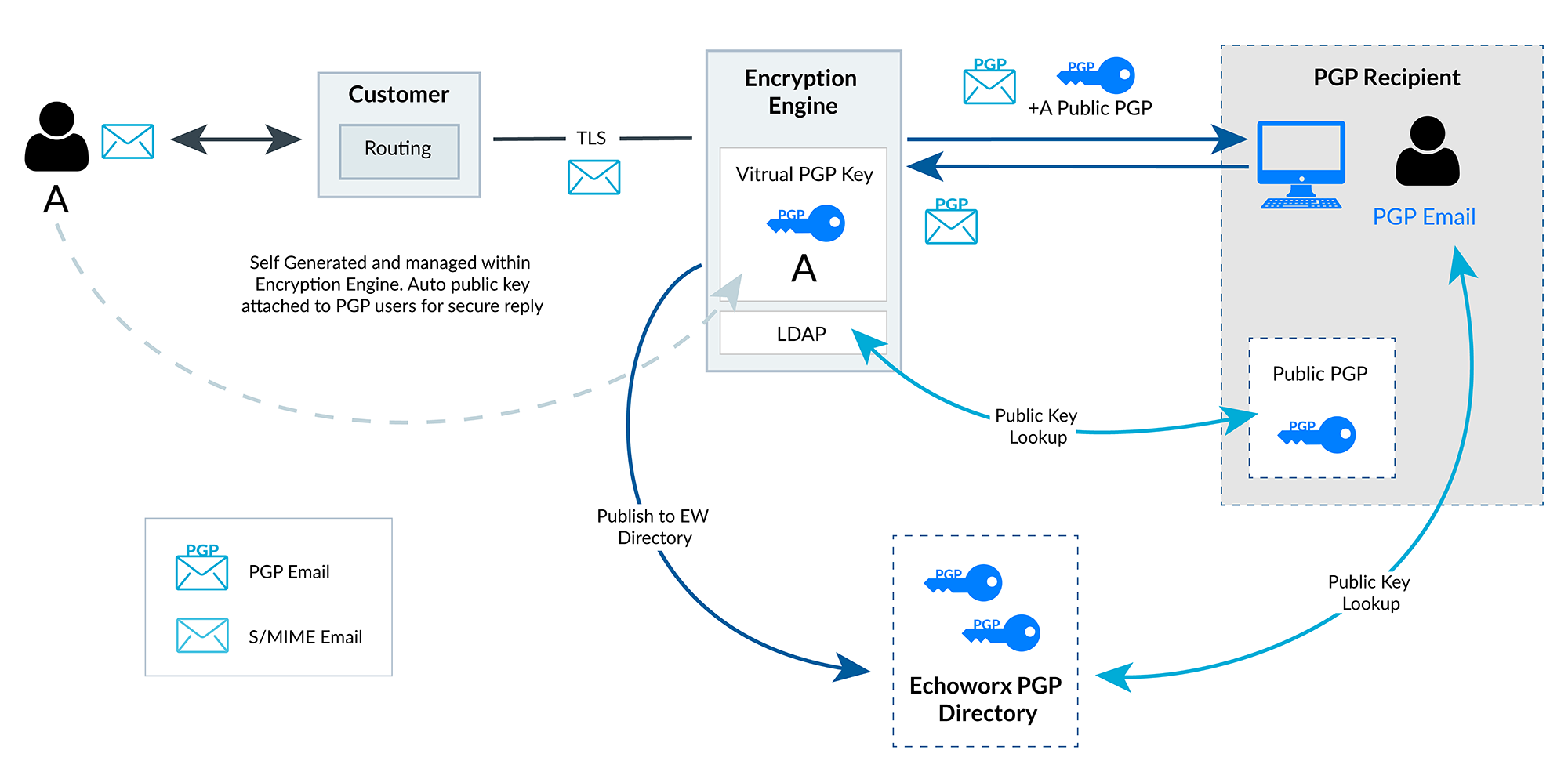
The diagram shows one example: a message from User A passes through the customer’s mail routing to the encryption engine, which finds the recipient’s public key and delivers the message PGP-encrypted. S/MIME follows the same routing model, using X.509 certificates instead of PGP keys.
1. Route messages securely
Organizations configure their email environment to direct eligible messages to the encryption engine, which receives them over a protected transport connection. Supported setups include standard SMTP routing for Microsoft 365, Google Workspace and existing secure email gateways.
The precise inbound and outbound routing configuration depends on the mail system. See Integrations for the patterns involved.
2. Apply encryption and signing policy
Policies may consider:
- the sender’s identity;
- the recipient’s domain;
- message content;
- data classification.
With the necessary keys and certificates available, messages can be encrypted or signed using PGP or S/MIME according to the intended exchange. Signing proves integrity and supports identity verification; it does not itself hide message content.
3. Find keys and deliver
The engine can use supported key and certificate lookup services, including configured LDAP directories. Depending on the recipient and available services, supported alternative delivery routes may include validated TLS, secure web portal access and encrypted document delivery.
| Method | What is protected | What the recipient needs |
|---|---|---|
| PGP | Message content, encrypted to the recipient’s public key | A PGP key pair and compatible PGP software or workflow |
| S/MIME | Message content, encrypted using the recipient’s certificate | An S/MIME certificate, its private key and a compatible email client |
| Validated TLS | The connection between mail servers while the message is in transit | A receiving mail server that supports TLS meeting the configured validation requirements |
| Secure web portal | Access to a message retrieved through an authenticated web portal | A web browser and the access method required by policy |
| Encrypted document | An attachment protected with a password or verification code | Software that opens the protected file, plus the password or code |
Scroll sideways to see the whole table.
These mechanisms have different security properties. TLS protects the connection, not the message once delivered. Portal and document methods depend on how access credentials are set and shared. None of them is equivalent to PGP or S/MIME message encryption.
4. Support replies and inbound processing
Recipient public-key handling can facilitate protected replies, for example when the sender’s public key accompanies an outbound PGP message. Inbound encrypted messages may be processed for decryption where the corresponding private keys and suitable routing rules are available.
Deployment prerequisites
Before deployment, review:
- mail-routing rules for outbound and inbound messages;
- directory sources for keys and certificates;
- sender identities and domains;
- certificate infrastructure and certificate authority integrations;
- key ownership and custody;
- expected recipient behavior and capabilities.
This marketing website does not process, store or decrypt customers’ messages. Those functions belong to the separately operated encryption service.
Map your mail flow
Contact us to discuss routing, policies and recipient requirements for your environment.