PGP email encryption
Cloud-Hosted PGP Email Encryption
PGP has long enabled organizations to exchange protected email with partners, suppliers and other external recipients. Traditional implementations can require organizations to maintain their own PGP services, distribute public keys and manage the operational details of encryption workflows.
CloudPGP uses the underlying Echoworx platform to support PGP processing and related key management through a cloud-hosted encryption architecture.
How hosted PGP works
Messages travel from the customer’s email routing to the encryption engine over a protected transport connection. The encryption process can use directory-based recipient public-key discovery, sender keys managed in the platform and configured key-publishing workflows.
The recipient’s ability to read or reply to PGP-encrypted messages depends on holding the relevant keys and using compatible PGP software or a compatible workflow.
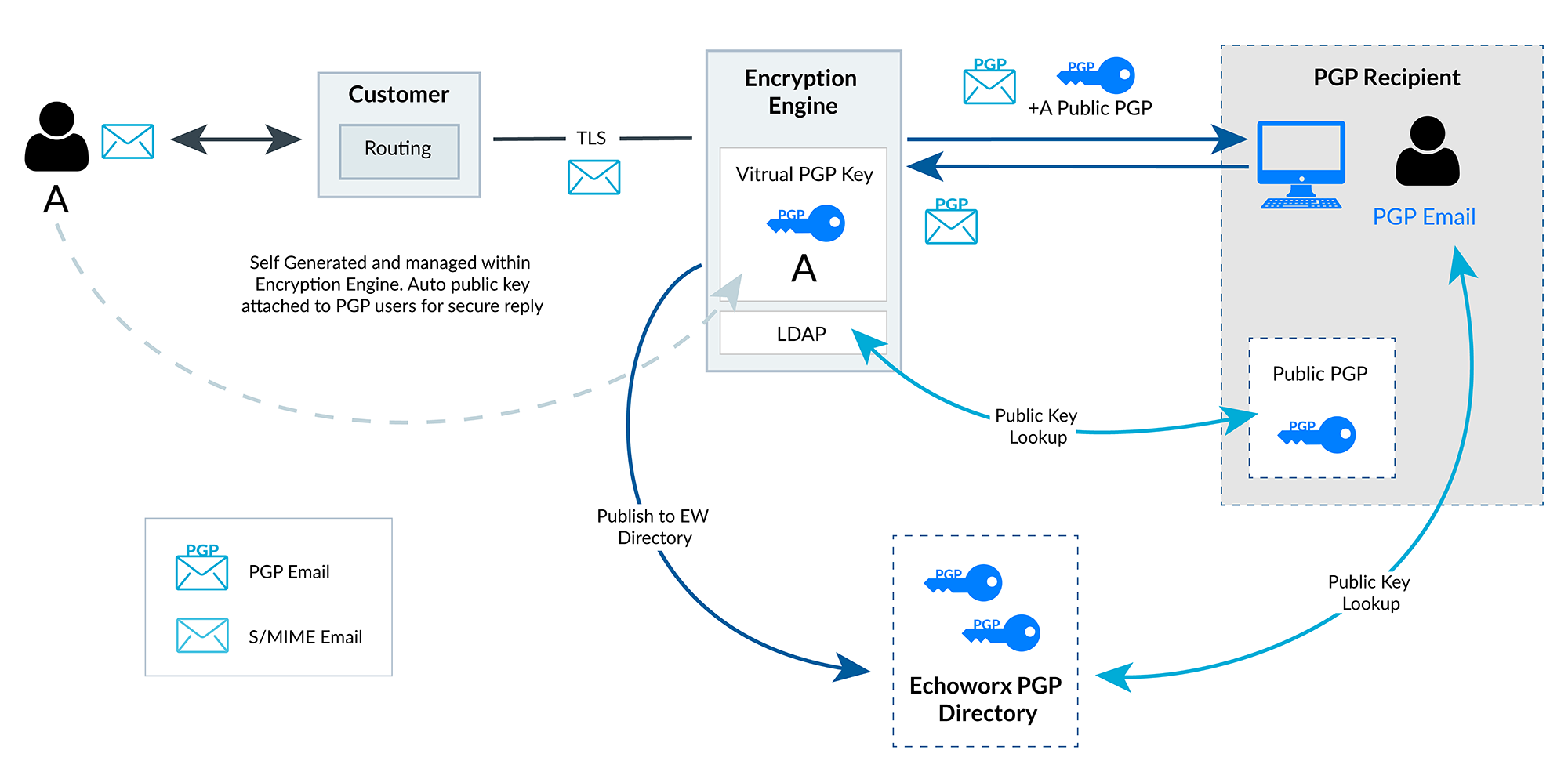
Reading the diagram
- Sender and routing: User A sends email through the customer’s existing mail routing, which passes eligible messages to the encryption engine over TLS.
- Sender key: in this example, User A’s PGP key is generated and managed within the encryption engine. The sender’s public key is attached to messages sent to PGP users so that they can reply securely.
- Recipient key lookup: the engine’s LDAP component looks up the recipient’s public PGP key.
- Directory publishing: the sender’s public key can be published to the Echoworx PGP directory, where PGP recipients can look it up.
- Delivery and reply: the PGP-encrypted message is delivered to the PGP recipient, who can reply using the sender’s public key.
Public-key discovery and exchange
To encrypt a message for a PGP recipient, the sender needs that recipient’s public key. Platform documentation describes several distinct workflows that can supply or distribute keys:
- LDAP lookups: recipient public keys can be retrieved from compatible LDAP key servers or domain directories configured for the deployment.
- PGP key directory: sender public keys can be published to a PGP key directory where external recipients can look them up.
- Public key sent with the message: a sender’s public key can accompany a protected outbound message, so the recipient can encrypt future replies.
- Key import: organizations migrating from an internally maintained PGP environment may import existing keys.
These are separate options rather than behavior that occurs in every deployment. Which sources are queried and which publishing steps are enabled depends on configuration.
Signing and decryption
A digital signature helps a recipient check who sent a message and whether it was altered after signing. A message that is signed but not encrypted can still be read by anyone who obtains it: signing alone does not encrypt content.
The platform supports policy-based signing choices, including a signing-only mode. Where policy requires the sender’s own key and that key cannot be used, the documented behavior is that the message fails and the sender receives a non-delivery report (NDR).
Inbound PGP messages can be decrypted when the platform holds the appropriate private key and routing sends those messages through the engine. Historical encrypted messages may require access to the original keys used to encrypt them, and any legacy-decryption workflow depends on configuration and key availability.
Migration from on-premises PGP
Moving PGP processing to a cloud-hosted platform can reduce the need to operate a dedicated encryption server. Importing existing keys and connecting existing directories can support continuity with established partners.
A migration plan should account for:
- mail routing changes for outbound and inbound messages;
- key custody, including where private keys will be held after migration;
- availability of the keys needed to read older encrypted messages;
- encryption and signing policies;
- interoperability testing with partners’ PGP software.
Cloud PGP questions
How is a recipient’s PGP public key found?
The platform can query configured sources such as LDAP key servers or domain directories, and a PGP key directory where public keys have been published. If no public key can be found, the message cannot be PGP-encrypted to that recipient. Depending on policy, a different delivery method may be used or the message may be handled according to configured rules. See How It Works.
Can we import our existing PGP keys?
The underlying platform supports importing existing PGP keys, which can help an organization move from an on-premises PGP server while keeping established key relationships with partners. Which keys are imported, and how private keys are handled after import, should be planned as part of the migration. See Key Management.
Is a digitally signed email also encrypted?
No. A signature lets the recipient verify the origin and integrity of a message, but it does not hide the content. A message can be signed only, encrypted only, or both signed and encrypted, depending on policy. The PGP vs. S/MIME page explains how this works in both standards.
Plan a hosted PGP deployment
Talk to us about your mail routing, key sources and partner requirements.